Claude Code从实战中理解–cc入门理解
从claude code实际开发中学习claude code基础理论和底层逻辑
1. Claude Code背景
1.1 Claude Code 安装
Claude Code不同系统的安装,以及调用不同大模型的方法请参考下面的内容
可以通过终端、桌面应用、IDE 扩展、claude.ai/code、远程控制、Slack 和 CI/CD 管道访问 Claude Code。界面决定了您如何看到和与 Claude 交互,但底层的代理循环是相同的
1.2 Claude Code基础使用
了解Claude Code的两种交互模式,一种是直接在bash终端进行交互;一种是进入Claude Code内进行
/交互了解Claude Code可使用的工具
Claude Code 可调用的工具
| 类别 | Claude 可以做什么 |
|---|---|
| 文件操作 | 读取文件、编辑代码、创建新文件、重命名文件、重新组织项目结构 |
| 搜索 | 按模式查找文件、使用正则表达式搜索内容、探索和理解整个代码库 |
| 执行 | 运行 shell 命令、启动本地服务器、运行测试、使用 Git 进行版本控制操作 |
| 网络 | 搜索网络、获取官方文档、查找和解释错误消息 |
| 代码智能 | 编辑代码后查看类型错误和警告、跳转到定义、查找引用(需要代码智能插件支持) |
内置工具是基础。您可以使用 skills 扩展 Claude 知道的内容、使用 MCP 连接到外部服务、使用 hooks 自动化工作流,以及将任务卸载给 subagents。这些扩展形成了核心代理循环之上的一层。
- Claude Code启动三种模式
- accept edits on 编辑模式
- plan mode on 计划模式
- bypass permissions on 绕过权限模式
1.3 npm和npx
JavaScript 是语言,Node.js 是让这个语言能在“浏览器之外”运行的环境,Node.js 的本质 = V8 JavaScript 引擎 + 操作系统能力封装 + 事件循环机制
┌────────────────────────┐
│   JavaScript 代码      │  ← 你写的代码
└─────────┬──────────────┘
          ↓
┌────────────────────────┐
│      V8 引擎           │  ← 负责执行 JS
└─────────┬──────────────┘
          ↓
┌────────────────────────┐
│     Node.js API        │  ← fs / http / path
└─────────┬──────────────┘
          ↓
┌────────────────────────┐
│       libuv            │  ← 事件循环 + 线程池
└─────────┬──────────────┘
          ↓
┌────────────────────────┐
│   操作系统 (OS Kernel) │  ← Linux / macOS / Windows
└────────────────────────┘- npm
npm 全称是 Node Package Manager(Node.js 包管理器), npm 最早由 Isaac Z. Schlueter 在 2010 年左右创建,让 JavaScript(Node.js)像 Python 的 pip、Ruby 的 gem 一样管理依赖
- 2017 年被 GitHub 收购
- 2020 年 GitHub 属于 Microsoft,所以 npm 现在属于 Microsoft 生态
- npx
npx 是 npm 5.2(2017 年)引入的一个工具
- 早期使用 npm 有一个痛点
-
如果你想运行一个工具包,必须
npm install
npx = Node Package eXecute(执行器),核心理念
不安装,也能直接运行 npm 包
- 下载包(临时)
- 执行
- 用完即丢弃
| 对比 | npm | npx |
|---|---|---|
| 作用 | 管理包 | 执行包 |
| 是否安装 | 安装依赖 | 不一定安装 |
| 是否长期存在 | 是 | 临时执行为主 |
| 典型用途 | npm install |
npx create-* |
2. Claude Code 初步认知
davila7/claude-code-templates是Claude Code 的模板市场 + CLI 工具,提供 100+ 可一键安装的组件,增强 Claude Code 的开发工作流
适用于 Anthropic Claude Code 的即用型配置。包含全面的 AI 代理、自定义命令、设置、钩子、外部集成 (MCP) 和项目模板,可增强您的开发工作流程。
这里把该仓库作为第一步,主要是能够选择安装agent,MCP,command等内容,并且交互式的安装能够知道安装在哪里,从而切换目录查看安装文件是什么,有什么作用,怎么写的,从而能够更好的理解claude code的底层逻辑和原理
claude-code-templates提供了网页进行交互式的筛选,并提供了安装命令
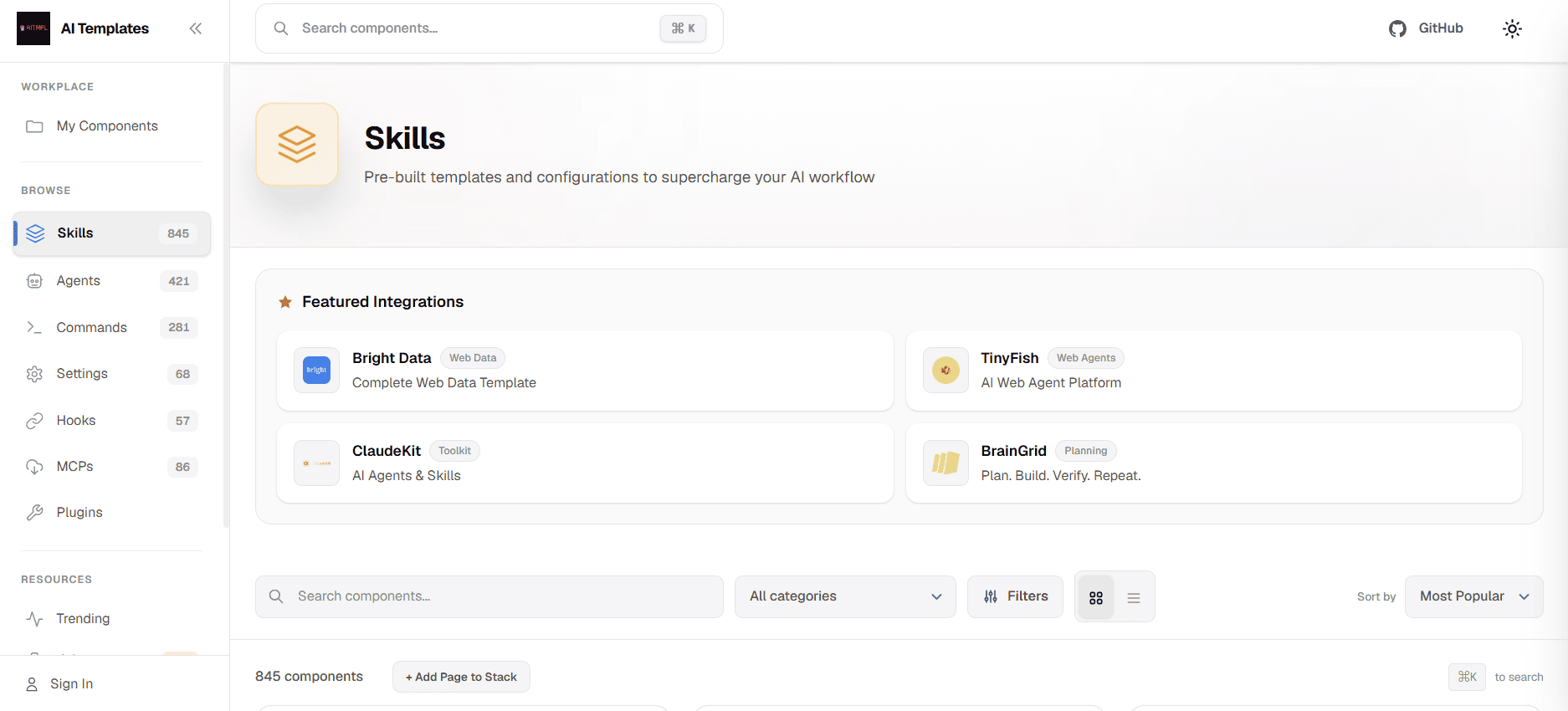
| 类型 | 描述 | 示例 |
|---|---|---|
| Agents | 针对特定领域的 AI 专家代理 | Security Auditor(安全审计)、React Performance Optimizer(React 性能优化)、Database Architect(数据库架构师) |
| Commands | 自定义 Slash 命令 | /generate-tests、/optimize-bundle、/check-security |
| MCPs | 外部服务集成(Model Context Protocol) | GitHub、PostgreSQL、Stripe、AWS、OpenAI |
| Settings | Claude Code 配置选项 | 超时设置(Timeouts)、内存设置(Memory Settings)、输出风格(Output Styles) |
| Hooks | 自动化触发器 | 提交前验证(Pre-commit Validation)、任务完成后操作(Post-completion Actions) |
| Skills | 具备渐进式披露(Progressive Disclosure)的可复用能力模块 | PDF 处理、Excel 自动化、自定义工作流 |
2.1 安装基础套件
- 安装最基础的开发栈
在命令行CLI输入下面的命令,主要是安装在当前目录下的.claude文件夹中,只限于当前目录的项目使用
npx claude-code-templates@latest --agent development-team/frontend-developer --command testing/generate-tests --mcp integration/github-integration --yes进入下面的安装过程,正常安装即可
════════════════════════════════════════════════════════════════
       🔮 Claude Code Templates


       Your starting point for Claude Code projects
════════════════════════════════════════════════════════════════

🚀 Setup Claude Code for any project language 🚀
                             v1.28.13

🌐 Templates: https://aitmpl.com
📖 Documentation: https://docs.aitmpl.com

🔧 Installing multiple components...
📦 Installing 3 components:
   Agents: 1
   Commands: 1
   MCPs: 1
   Settings: 0
   Hooks: 0
   Skills: 0
   Installing agent: development-team/frontend-developer
🤖 Installing agent: development-team/frontend-developer
📥 Downloading from GitHub (main branch)...
   Installing command: testing/generate-tests
--agent development-team/frontend-developer:安装一个专为前端开发设计的 AI 代理(Agent)。它会作为你的前端专家,协助处理 UI 组件、状态管理和现代前端架构等任务--command testing/generate-tests:注册一个用于自动生成测试代码的自定义斜杠命令(如 /generate-tests),让你能随时让 AI 帮你编写测试用例--mcp integration/github-integration:配置 GitHub 集成的 MCP(Model Context Protocol)服务器,打通 Claude Code 与 GitHub 的连接,方便进行代码仓库交互和协作。
- 查看文件结构
在当前文件夹中,能够看到安装完成后会生成.claude文件,文件中包含着agent,command和.mcp.json等内容,分别对应着安装的agent,command和mcp
tree -ha ./
[4.0K]  ./
├── [4.0K]  .claude
│   ├── [4.0K]  agents
│   │   └── [ 14K]  frontend-developer.md
│   └── [4.0K]  commands
│       └── [2.6K]  generate-tests.md
└── [ 235]  .mcp.json
agent和command的文件,本质上就是
md文档,包含了各自的内容,每个功能件的md都有各自的写法
2.2 解析功能文件
2.2.1 Agent文件解析
本地 agent 是通过 .claude/agents/ 目录下的 .md 文件定义的,Claude Code 会自动识别并使用它们
有两种触发方式:
- 自动触发(推荐)
当你的任务匹配 agent 的 description 时,Claude 会自动用 Agent 工具调用它:
你: “帮我用 React 搭一个用户管理页面,需要 TypeScript 和响应式设计”
Claude 判断任务匹配 frontend-developer 的描述,自动调用。
- 手动指定
你也可以在对话中明确要求:
你: “用 frontend-developer agent 来做这个前端任务”
以当前的frontend-developer.md为例,解析其中的内容
---
name: frontend-developer
description: "Use when building complete frontend applications across React, Vue, and Angular frameworks requiring multi-framework expertise and full-stack integration. Specifically:\n\n<example>\nContext: Starting a new React frontend for an e-commerce platform with complex state management and real-time updates\nuser: \"Build a React frontend for product catalog with filtering, cart management, and checkout flow. Need TypeScript, responsive design, and 85% test coverage.\"\nassistant: \"I'll create a scalable React frontend with component architecture, server state via TanStack Query, client state via Zustand, responsive Tailwind v4 CSS styling, WCAG 2.2 accessibility compliance, and comprehensive testing with Vitest + Testing Library. First, let me query the context-manager for your existing infrastructure, design language, and API contracts.\"\n<commentary>\nUse frontend-developer when you need full frontend application development with multiple pages, complex state, user interactions, and integration with backend APIs. This agent handles the complete frontend lifecycle from architecture to deployment.\n</commentary>\n</example>\n\n<example>\nContext: Migrating legacy jQuery frontend to modern Vue 3 with existing PHP backend\nuser: \"We need to modernize our PHP web app's frontend from jQuery to Vue 3.5. The backend is stable. Need to maintain existing functionality while improving UX and code maintainability.\"\nassistant: \"I'll architect a Vue 3.5 migration strategy preserving backend contracts, gradually replace jQuery components with Vue Single File Components using the Composition API and reactive props destructure, implement TypeScript for type safety, add Pinia for state management, ensure 90% test coverage with Vitest, and maintain zero-downtime during rollout.\"\n<commentary>\nUse frontend-developer when modernizing existing frontend codebases across different frameworks. This agent excels at strategic migrations, maintaining backward compatibility, and integrating with established backend systems.\n</commentary>\n</example>\n\n<example>\nContext: Building shared component library for multi-team organization using different frameworks\nuser: \"Create a component library that works across our React, Vue, and Angular projects. Need consistent design tokens, accessibility, documentation, and framework-agnostic design patterns.\"\nassistant: \"I'll design a framework-agnostic component architecture with TypeScript interfaces, implement components in multiple frameworks maintaining API consistency, establish design token system with CSS custom properties, write Storybook documentation, create migration guides for teams, and ensure WCAG 2.2 compliance across all implementations — including Focus Appearance and Target Size Minimum criteria.\"\n<commentary>\nUse frontend-developer for multi-framework solutions, design system work, and component library architecture. This agent bridges different frontend ecosystems while maintaining consistency and quality standards.\n</commentary>\n</example>"
tools: Read, Write, Edit, Bash, Glob, Grep
---
name: frontend-developer:定义了该智能体的名称为“前端开发者”tools: Read, Write, Edit, Bash, Glob, Grep: 赋予了该智能体在本地环境中执行操作的权限。它可以读取文件(Read)、写入/创建文件(Write)、编辑现有代码(Edit)、运行终端命令(Bash),以及使用 Glob 和 Grep 进行文件和内容的搜索匹配。这说明它不仅是个“聊天机器人”,还是一个能直接动手写代码、改配置的“工程师”。(现在Claude Code已经升级了非常多内置的功能工具,后续介绍)
- 核心描述
是Agent的“灵魂”,界定了它的专业领域:构建跨 React、Vue 和 Angular 框架的完整前端应用,并具备多框架专长及全栈集成能力
采用这种包含 <example>、<commentary> 等标签的结构,遵循了大语言模型(LLM)提示词工程(Prompt Engineering)中的高级写法,能够清晰的定位每一个部分,就像书里的书本里的目录和批注
这里的描述通过提供三个完整的对话示例(User 提问 -> Assistant 回答),AI 能清晰地学习到它应该以什么样的语气、逻辑和专业深度来回应。这被称为“少样本提示(Few-Shot Prompting)”,能极大提高 AI 输出格式和内容的稳定性
每个例子开头的 <Context> 和结尾的 <commentary> 就是在划定界限。它在告诉调度器:“只有当用户需要从零搭建复杂应用、进行遗留代码迁移、或者构建跨框架组件库时,才激活我。”如果是简单的 CSS 居中问题或纯后端数据库设计,就不该触发这个角色
- Tools工具权限
Claude Code 工具链的发展历史,是一部从“简单的聊天原型”演变为“多智能体生产力主体”的进化史。从操作系统看,claude code tool对应Unix哲学
Claude Code 的工具(Tools)并不是一开始就有现在这套形态,它实际上经历了从 LLM 只能聊天 → 调用函数(Function Calling)→ AI Agent 使用工具(Tool Use)→ 软件工程 Agent 的演化过程
“Claude Code 内置工具 ≠ Agent Markdown 可写工具全集”
| 工具 | 作用 | 类似 Linux 命令 |
|---|---|---|
| Read | 读取文件内容 | cat |
| Write | 创建或覆盖文件 | > |
| Edit | 修改已有文件 | sed / vim |
| Bash | 执行 Shell 命令 | bash |
| Glob | 按模式查找文件 | find |
| Grep | 搜索文本内容 | grep |
而2026年的Claude Code已经内置了非常多的工具,涵盖了文件操作、搜索、执行、网络和代码智能等多个方面,能够满足开发过程中各种复杂的需求,官网中提供了更全面的介绍https://code.claude.com/docs/zh-CN/tools-reference ,下面是全部的Claude Code工具列表,按照功能分类:
| 工具 | 作用 |
|---|---|
| Read | 读取文件 |
| Write | 创建/覆盖文件 |
| Edit | 修改文件 |
| NotebookEdit | 修改 Jupyter Notebook |
| LSP | 代码智能分析(类型检查、跳转定义等) |
| 工具 | 作用 |
|---|---|
| Glob | 按文件名模式查找 |
| Grep | 搜索文件内容 |
| WebSearch | 网页面搜索 |
| WebFetch | 网页抓取 |
| 工具 | 作用 |
|---|---|
| Bash | 执行终端命令 |
| KillBash | 停止后台任务 |
| 工具 | 作用 |
|---|---|
| Agent / Task | 创建子 Agent |
| 工具 | 作用 |
|---|---|
| TaskCreate | 创建任务 |
| TaskGet | 查看任务 |
| TaskList | 列出任务 |
| TaskUpdate | 更新任务 |
| TodoWrite | 更新Todo列表 |
| 工具 | 作用 |
|---|---|
| EnterPlanMode | 进入规划模式 |
| ExitPlanMode | 退出规划模式 |
| AskUserQuestion | 向用户提问 |
还有任务,定时任务等一些工具,基本是就全了
- 系统提示词(行为指令)
首先是角色设定,在文中的第一行,定义了它的身份、专长和关注点
模块分析
| 模块 | 作用 | 要点 |
|---|---|---|
| Communication Protocol | 强制先获取项目上下文 | 要求向 context-manager 发 JSON 请求,避免重复提问 |
| Execution Flow | 三阶段工作流 | Context Discovery → Development → Handoff |
| Framework Expertise | 三大框架最新特性 | React 19, Vue 3.5, Angular 20 的核心 API |
| Tooling Defaults | 工具链偏好 | Vite 6, pnpm, Tailwind v4, Biome v2 |
| State Management | 状态管理架构 | 服务端/客户端分离,TanStack Query + Zustand/Pinia/Signals |
| Testing Stack | 测试策略 | Vitest + Testing Library + MSW v2 + Playwright |
| Performance Patterns | 渲染策略决策树 | SSR/SSG/SPA 选型 + Core Web Vitals 目标 |
| Accessibility | WCAG 2.2 AA | 3 个新增标准(Focus Appearance, Target Size, Auth) |
| TypeScript Config | TS 严格配置 | strict + no implicit any + null checks |
| Real-Time Features | 实时功能 | WebSocket, SSE, 乐观更新 |
| AI Guidelines | AI 辅助开发规范 | tsc 检查、CLS 风险、200 行上限审查 |
- 启动Agent
在终端输入claude之后,输入提示词开始搭建
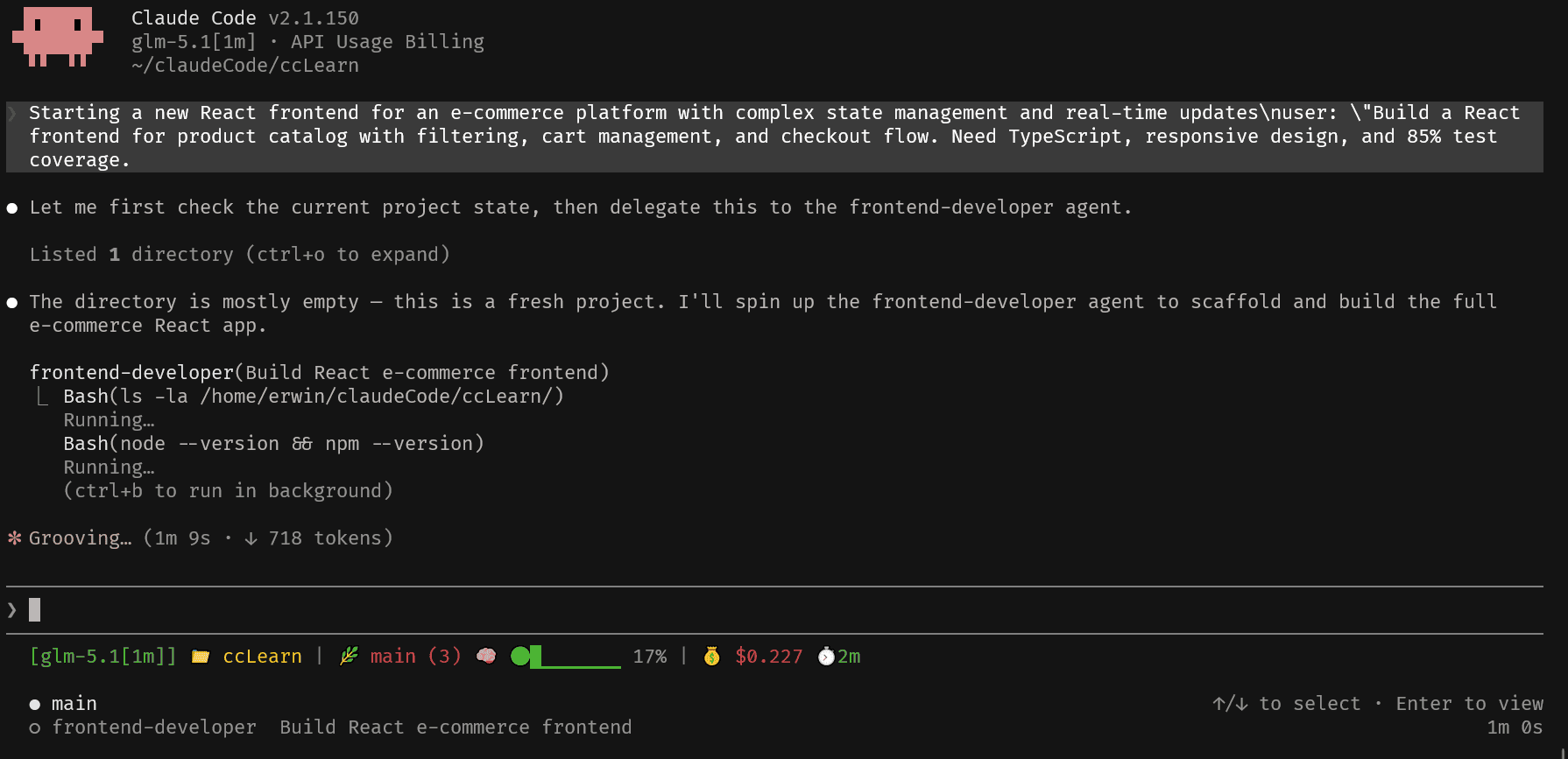
- 能够看到开始调用agent
- 在最下方main是一个agent,frontend-developer是另外一个agent,并且可以使用方向键进行切换
2.2.2 Command文件解析
这里是安装在项目目录中,所以command的文件夹是在
.claude/commands/**.mdClaude Code也包含了多种内置的命令,安装过程中已经嵌入,自定义的的全部放在文件夹中即可调用
在 Claude Code 中,Command(命令)是一种显式调用的自动化工作流,通常以 / 开头触发(例如 /commit "message" 或 /review)。它的核心作用是将高频重复、步骤固定的操作封装为“一键触发”的快捷方式,从而简化复杂操作并标准化团队流程
| 特性 | 内置命令 (Built-in) | 自定义命令 (Custom Commands) |
|---|---|---|
| 存在形式 | 底层代码、系统提示词 | 独立的 .md 文件 |
| 存放位置 | 系统内部 | .claude/commands/ 或 ~/.claude/commands/ |
| 典型代表 | /clear, /config, /doctor |
/generate-tests, /code-review |
| 可定制性 | 不可修改 | 完全由用户自定义 |
每个自定义的 Command 本质上是一个 Markdown 文件,由 YAML Frontmatter(前置元数据) 和 Markdown 内容(指令) 两部分组成
- YAML Frontmatter:用于声明命令的名称(name)、描述(description)以及允许调用的工具白名单(allowed-tools)等元数据
- Markdown 内容:包含具体的任务指令。它还支持独特的“上下文命令(Context)”功能,可以在调用时自动执行如 git status 等终端命令,并将结果直接注入到上下文中,帮助 AI 了解当前状态
可以在 .claude/commands/ 中将自己的命令定义为文件,或从
plugin安装它们。Skills是打包多步骤命令的推荐方式。
在最新的系统演进中,Commands 已经正式并入 Skills 体系,被重新定义为一种“任务型 Skill”。这意味着,虽然你仍然可以通过 /command 手动显式触发它,但在底层架构上,它已经与具备自动触发能力的 Skill 融为一体
这个命令是—-自动分析指定文件或组件,并生成完整的测试代码(Test Suite)
这里看到命令是不同与agent写法,有tools,description,但是命令可以包含参数,Command YAML:通常是“被外部注册/文件路径决定身份”,Command(命令)本身的身份不依赖内部字段 name,而是由外部结构决定的
---
allowed-tools: Read, Write, Edit, Bash
argument-hint: [file-path] | [component-name]
description: Generate a complete test file for a specified source file or component. Use when the user explicitly asks to write, create, or generate tests for a specific file.
---

# Generate Tests

Generate comprehensive test suite for: $ARGUMENTS

## Current Testing Setup- 元数据配置(YAML Frontmatter)
allowed-tools: 明确授权了 Read, Write, Edit, Bash 四个工具。这确保了 AI 在执行时有权限读取源码、写入测试文件以及执行终端命令argument-hint: 提供了参数提示[file-path]|[component-name],当你在终端输入/generate-tests时,界面会提示你需要传入文件路径或组件名description: 描述了该命令的用途。这个描述非常重要,因为现在 Command 已经与 Skill 体系合并,良好的描述有助于 AI 在上下文中自动识别并推荐该命令
- 动态上下文注入(Context Commands)
在 ## Current Testing Setup 下,使用了 ! 加上反引号的语法(如 !cat package.json ... )
- 运行机制:当你触发
/generate-tests时,Claude Code 会优先在本地终端执行这些Bash命令 - 作用:它会自动探测当前项目使用的测试框架(Jest/Vitest等)、已有的测试文件结构以及覆盖率配置,并将这些真实结果直接注入到 AI 的上下文中
- 结构化的任务指令(Task Instructions)
比较详细的给出了策略,语言配置等
- 六步走策略:从分析结构、制定策略、设计 Mock、编写单元测试、集成测试到质量检查,步骤清晰
- 多语言/框架适配:内置了 React、Vue、Node.js、Python、Go、Rust 等主流技术栈的测试规范
这就是一个优秀command的实例,元数据的编写,执行的命令提示,具体的上下文和任务指令等,所有的command都是类似的本质上
- 命令的使用
打开claude code进入CLI后,输入 / 可以查看所有可用命令,或输入 / 后跟字母来筛选,命令只在您的消息开头被识别。命令名称后面的文本作为参数传递给它
2.2.3 MCP (Model Context Protocol)
MCP 本质上是一套“开放协议(标准)”,它规范了“工具调用的底层写法”,从而让大模型能够标准化地连接外部工具,它不是某个具体的软件或工具,而是一套通信规则和标准。
一个开放标准,用于将 AI 工具连接到外部数据源和服务。MCP servers 为 Claude 提供 Slack、Jira、数据库、浏览器和数百个其他集成的新工具,可以通过 /mcp 连接服务器或将它们添加到 .mcp.json。只要外部工具(比如数据库、GitHub)按照 MCP 的协议标准制作成“MCP Server”,任何支持 MCP 的 AI 应用(比如 Claude Code)都能直接插上使用,不需要再为每个工具单独写适配代码
AI 模型与外部工具交互时的兼容性问题,被业界形象地称为“AI 世界的 USB-C 接口”,就像给AI外接了服务
有了 MCP 后:Claude Code 能够无缝对接 GitHub、JIRA、Sentry、PostgreSQL、Figma 等外部服务,实现跨系统的自动化工作流。MCP 服务器充当“翻译官”,将 Claude Code 的请求翻译成外部服务能理解的格式。
- 连接MCP服务器
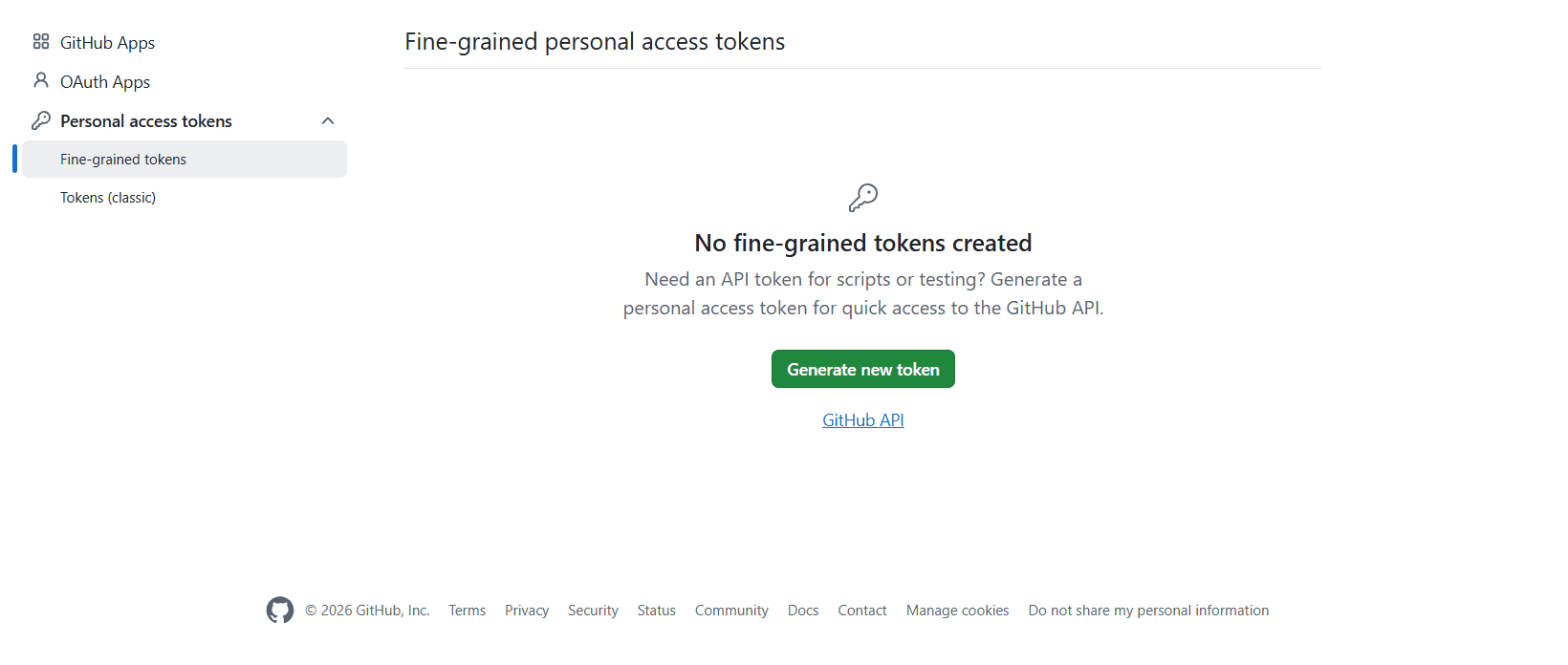
上面使用npx claude-code-templates@latest --mcp integration/github-integration进行交互式安装,主要是npx主导的安装claude code与github交互的服务器,此服务器需要获取github的API
还有其它方式添加服务器,包括
- 添加本地服务器:在您的机器上运行程序而不是连接到 URL
- 直接编辑 .mcp.json:自己编写 JSON 条目而不是使用命令
- 连接需要登录的服务器:添加需要浏览器登录才能使其工具工作的托管服务器(Context7 需要网页验证登录)
Claude Code官网中提供了连接到 Claude Code 文档 MCP 服务器,这是一个托管服务器,具有对 Claude Code 文档的全文搜索功能。它不需要身份验证或任何特殊配置,因此它很适合作为第一个服务器来测试设置流程
所有服务器的步骤都相同:添加它、检查连接状态,然后在会话中使用它,最后可选择清理步骤
在终端CLI中添加MCP服务器
claude mcp add --transport http claude-code-docs https://code.claude.com/docs/mcp检查连接状态
claude mcp list使用服务器
claude,输入Use the claude-code-docs server to look up what MCP_TIMEOUT does删除服务器
claude mcp remove claude-code-docs
服务器保存位置
| 范围 (Scope) | 配置文件位置 | 可用范围 |
|---|---|---|
| local | ~/.claude.json(在此项目的条目下) |
仅您,仅此项目(默认值) |
| project | 项目根目录中的 .mcp.json |
克隆该项目的所有人 |
| user | ~/.claude.json(在顶级 mcpServers 键下) |
仅您,所有项目 |
- mcp.json文件解析
上述github选择安装在当前项目文件中,所以当前目录下有.mcp.json文件
{
  "mcpServers": {
    "github": {
      "command": "npx",
      "args": [
        "-y",
        "@modelcontextprotocol/server-github"
      ],
      "env": {
        "GITHUB_PERSONAL_ACCESS_TOKEN": "<YOUR_TOKEN>"
      }
    }
  }
}把"<YOUR_TOKEN>",更改为github创建的GITHUB_PERSONAL_ACCESS_TOKEN即可
2.2.4 Skills 解析
上述三个小节介绍了AGENT,MCP,Command的安装路径和文件内容解析,接着是重要的Skills,现在自定义Commands已经统一到Skills,而Skills 扩展了 Claude 能做的事情。创建一个 SKILL.md 文件,其中包含说明,Claude 会将其添加到其工具包中
当前项目层面的Skills会放置在.claude/skills文件夹中,每个skill单独以自己的名字为文件夹,里面包含skill所需要调用的文件,如下所示:
├── code-reviewer
│   ├── SKILL.md
│   ├── references
│   │   ├── code_review_checklist.md
│   │   ├── coding_standards.md
│   │   └── common_antipatterns.md
│   └── scripts
│       ├── code_quality_checker.py
│       ├── pr_analyzer.py
│       └── review_report_generator.py
└── frontend-design
    ├── LICENSE.txt
    └── SKILL.md
Agent和skill都是markdown文件,写法也很类似,所以要把定位搞清楚
| 类型 | Agent | Skill |
|---|---|---|
| 定位 | AI员工 | AI工具 |
| 作用 | 决定”谁来干活” | 决定”用什么能力干活” |
| 触发方式 | 用户主动选择 | Claude自动调用 |
| 生命周期 | 整个会话 | 单次任务 |
| 数量 | 通常一个 | 可以多个 |
| 类比 | 项目经理 | 专业工具箱 |
- YAML文件
同Agent一样,skill也是需要有YAML,先了解这个skill是做什么的,比如这是Code Reviewer 的工具集(Toolkit)的说明指南。它提供了一套现代化的代码审查(Code Review)解决方案,结合了自动化脚本和最佳实践文档,旨在帮助开发团队高效地提升代码质量
---
name: code-reviewer
description: Comprehensive code review skill for TypeScript, JavaScript, Python, Swift, Kotlin, Go. Includes automated code analysis, best practice checking, security scanning, and review checklist generation. Use when reviewing pull requests, providing code feedback, identifying issues, or ensuring code quality standards.
---- name: 技能名称,必须唯一
- description: 简要描述技能的作用和用途
- 核心功能(三大自动化脚本)
该kit 通过三个Python脚本提供自动化的代码审查能力:
- PR Analyzer(PR 分析器):用于自动化分析 Pull Request(合并请求),内置了最佳实践和可配置的模板,支持质量检查
- Code Quality Checker(代码质量检查器):对代码进行深度分析,提供性能指标、优化建议,并支持自动修复功能
- Review Report Generator(审查报告生成器):用于生成专家级的、生产级别的审查报告,支持自定义配置
参考文档体系
- Code Review Checklist(代码审查清单):包含详细的模式、代码示例、最佳实践以及需要避免的反模式(Anti-patterns
- Coding Standards(编码规范):提供完整的开发工作流、优化策略、工具集成及故障排除指南
- Common Antipatterns(常见反模式):涵盖技术栈细节、配置示例、安全考量及可扩展性指导
2.2.5 Hooks
Hooks 是用户定义的 shell 命令、HTTP 端点或 LLM 提示,在 Claude Code 生命周期中的特定点自动执行。
Hooks的价值就在于:把这些动作从你记得做变成系统自动做,并且可以做到该后台跑就后台跑,该阻断就阻断,该提醒就提醒,类似CI/CD
Hooks是Claude Code的事件驱动自动化系统:在特定事件触发时,自动执行一组Hook,主要有两种形态:
- 命令型Hooks(Command): 运行Shell命令/脚本,适合自动化与校验(格式化,检查,通知,测试)
- 提示型Hooks(Prompt): 在stop/SubanentStop事件里,让claude再做一次停下前的质量检查,根据结果决定继续还是停止
- 配置层级详解
| 配置层级 | 文件路径 | 是否提交 Git | 作用范围 | 适用场景 |
|---|---|---|---|---|
| 用户级 (User) | ~/.claude/settings.json |
❌ 否 | 全局生效,影响当前用户本机所有项目 | 个人编码偏好、通用习惯、全局安全拦截规则(如禁止硬编码密码) |
| 项目级 (Project) | .claude/settings.json |
✅ 是 | 仅在当前项目仓库中生效 | 团队共享约定、代码格式化规则、敏感文件保护、自动化测试拦截 |
| 本地覆盖 (Local) | .claude/settings.local.json |
❌ 否 (需加入 .gitignore) |
仅在当前项目本地环境生效 | 临时覆盖团队配置、个人调试、排查问题时关闭耗时 Hook |
- Simple Notifications安装
这里选择最简单的一个Simple Notifications,这种一键安装模板的方式,特别适合需要监控长时间运行任务、远程工作,或者希望在任务执行期间离开电脑去喝咖啡的用户,可以在Claude Code的会话中发送通知
npx claude-code-templates@latest --hook automation/simple-notifications安装之后,先选择在当前目录安装,得到
.claude/
└── settings.local.jsonjson中内容,如下
{
  "hooks": {
    "Stop": [
      {
        "hooks": [
          {
            "type": "command",
            "command": "if command -v osascript >/dev/null 2>&1; then osascript -e 'display notification \"Claude has finished working\" with title \"Claude Code\"'; elif command -v notify-send >/dev/null 2>&1; then notify-send 'Claude Code' \"Claude has finished working\"; fi"
          }
        ]
      }
    ],
    "Notification": [
      {
        "hooks": [
          {
            "type": "command",
            "command": "if command -v osascript >/dev/null 2>&1; then osascript -e 'display notification \"Claude needs your input\" with title \"Claude Code\" sound name \"Ping\"'; elif command -v notify-send >/dev/null 2>&1; then notify-send -u critical 'Claude Code' \"Claude needs your input\"; fi"
          }
        ]
      }
    ]
  }
}
很明显,这是一个Claude Code Hook配置,定义了两个事件
{
  "hooks": {
    "Stop": [...],
    "Notification": [...]
  }
}
可以理解成
第一部分:Claude Code停止工作时,执行一个Shell命令;停止之后执行command -v osascript,检查是否存在osacript(这是macOS自带的命令),如果存在执行osascript -e \'display notification "Claude has finished working" with title "Claude Code"';如果不是macOS,就检查Linux通知工具
第二部分:在Claude Code需要用户输入时,执行命令。
2.2.6 Settings
Claude Code 的 Settings 本质上是:
一个“控制 AI 行为 + 开发环境行为”的多层配置系统
settings.json 本质上就是 JSON 文件,但在 Claude Code 里它不是“随便写 JSON”,而是一个有固定 schema(结构规则)的配置文件
Claude Code Settings 主要解决 4 类问题
- 控制 AI 行为(Behavior Control):是否允许调用工具(tools)
- 定义开发环境规则(Environment Control)
- 个性化体验
- 多层协作控制
settings 文件不是只有 JSON 结构,还有“加载优先级规则”:
| 作用域 | 位置 | 影响范围 | 与团队共享? | 说明 |
|---|---|---|---|---|
| Managed | 系统级(plist / registry / managed-settings.json) | 整台机器所有用户 | ✅ 是(IT 部署) | 企业或系统强制策略,优先级最高 |
| User | ~/.claude/ |
当前用户所有项目 | ❌ 否 | 个人默认配置 |
| Project | .claude/(仓库内) |
当前 repo 所有协作者 | ✅ 是(git 提交) | 团队共享配置 |
| Local | .claude/settings.local.json |
当前用户 + 当前 repo | ❌ 否(gitignored) | 个人本地覆盖配置 |
当在多个作用域中出现相同的设置时,Claude Code 按优先级顺序应用它们:
- Managed(最高)- 无法被任何内容覆盖
- 命令行参数 - 临时会话覆盖
- Local - 覆盖项目和用户设置
- Project - 覆盖用户设置
- User(最低)- 当没有其他内容指定设置时应用
- Settings 安装
这里安装一个上下文监测的小配置,在shell中输入npx claude-code-templates@latest --setting statusline/context-monitor
- 这里选择在项目中安装,在当前文件夹中找到
.claude,发现创建了setting.local.json文件,文件中内容为
{
  "statusLine": {
    "type": "command",
    "command": "python3 .claude/scripts/context-monitor.py"
  }
}
表示嵌入了命令,设置名称,执行文件,同时发现scripts/有context-monitor.py文件,安装好之后,打开claude code发现下方出现了上下文状态条

2.2.7 创建和分发 plugin marketplace
CLaude Code的Plugin系统,就是让人能给Claude Code装App机制,Plugin更像是能把一整套工作流一行命令安装到自己电脑上
上面已经介绍了claude code中的Agent,Command,skills,Hooks,这些都可以分享,但是需要复制文件夹放置到相应的位置才好用,Plugin就是用来解决不好分享的问题
Plugin 解决的就是这个分发问题。它把各种扩展能力(Skills、Hooks、MCP 配置、LSP 配置)打包成一个目录,支持版本管理和一键安装。
plugin marketplace 是一个目录,让你能够将 plugins 分发给他人。Marketplace 提供集中式发现、版本跟踪、自动更新以及对多种源类型(git 存储库、本地路径等)的支持。
- 添加插件市场
插件通过Marketplace(市场)分发,需要先告诉 Claude Code 去哪里找插件。打开 Claude Code,输入下面命令,这条命令会注册官方插件市场
/plugin marketplace add https://github.com/affaan-m/ECC- 安装插件
/plugin install ecc@ecc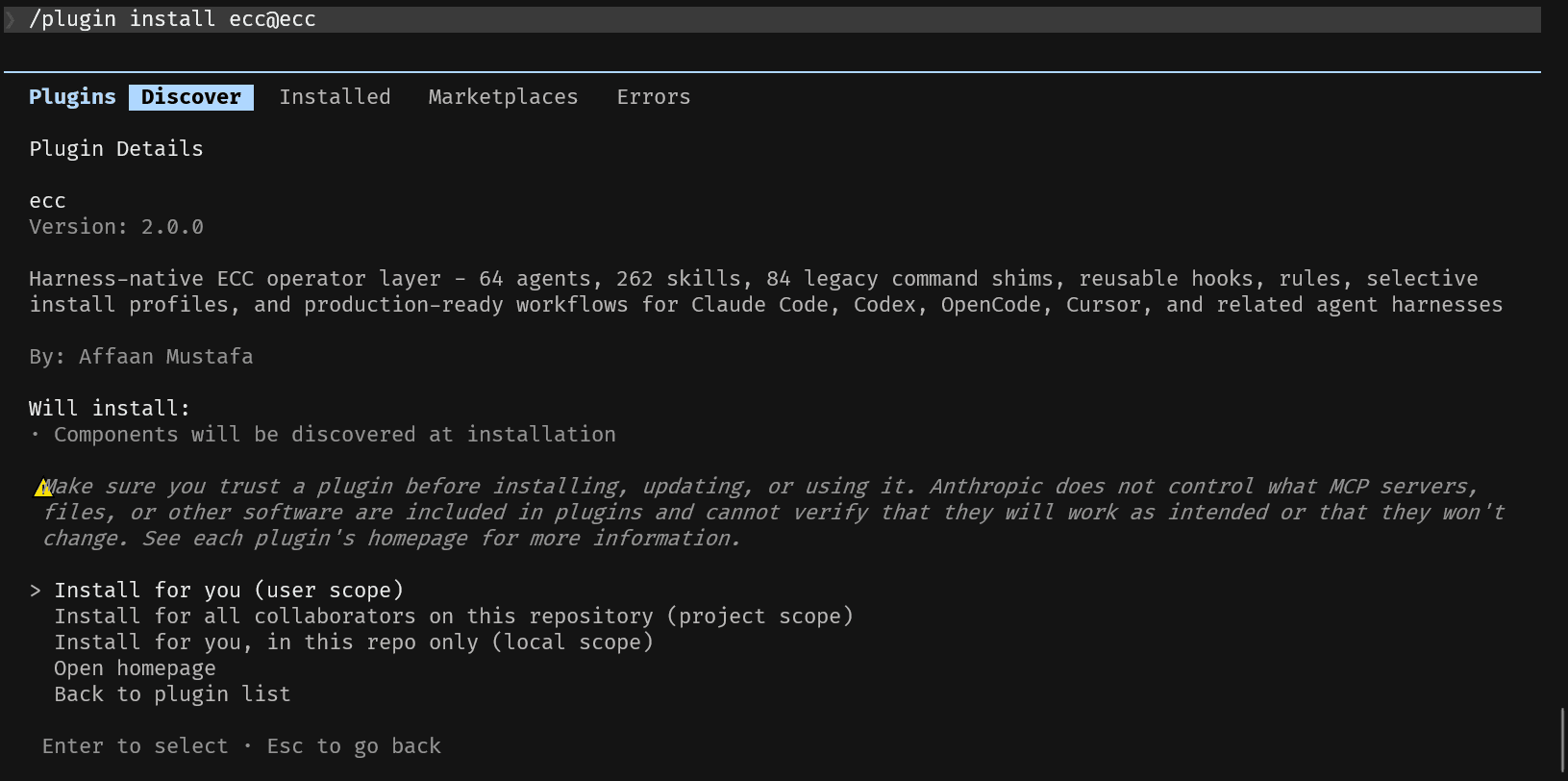
而安装的文件放置在了.claude/plugins/marketplaces/ecc
[4.0K]  .
├── [8.3K]  AGENTS.md
├── [9.9K]  CHANGELOG.md
├── [3.8K]  CLAUDE.md
├── [5.1K]  CODE_OF_CONDUCT.md
├── [6.0K]  COMMANDS-QUICK-REF.md
├── [ 13K]  CONTRIBUTING.md
├── [1.0K]  LICENSE
├── [ 86K]  README.md
├── [ 36K]  README.zh-CN.md
├── [1.7K]  RULES.md
├── [6.9K]  SECURITY.md
├── [1.1K]  SOUL.md
├── [1.8K]  SPONSORING.md
├── [3.1K]  SPONSORS.md
├── [9.9K]  TROUBLESHOOTING.md
├── [   6]  VERSION
├── [ 29K]  WORKING-CONTEXT.md
├── [4.9K]  agent.yaml
├── [4.0K]  agents
├── [4.0K]  assets
├── [4.0K]  commands
├── [ 371]  commitlint.config.js
├── [4.0K]  config
├── [4.0K]  contexts
├── [4.0K]  docs
├── [4.0K]  ecc2
├── [ 40K]  ecc_dashboard.py
├── [ 854]  eslint.config.js
├── [4.0K]  examples
├── [2.5K]  greptile.json
├── [4.0K]  hooks
├── [1.5K]  install.ps1
├── [1.2K]  install.sh
├── [4.0K]  integrations
├── [4.0K]  legacy-command-shims
├── [4.0K]  manifests
├── [4.0K]  mcp-configs
├── [112K]  package-lock.json
├── [ 13K]  package.json
├── [4.0K]  plugins
├── [1.7K]  pyproject.toml
├── [4.0K]  research
├── [4.0K]  rules
├── [4.0K]  scaffolds
├── [4.0K]  schemas
├── [4.0K]  scripts
├── [ 12K]  skills
├── [4.0K]  src
├── [4.0K]  tests
├── [ 15K]  the-longform-guide.md
├── [ 28K]  the-security-guide.md
├── [ 16K]  the-shortform-guide.md
└── [ 81K]  yarn.lock
后续介绍一下怎么打包plugin,怎么发布plugin等,现在只要了解有这个操作即可