Nextflow Fetchngs分析
Vibe Coding Learning Process
本文在学习完基础nextflow知识后,参考nf-core的fetchngs项目进行分析学习如何搭建工程化项目
nf-core/fetchngs 是一个生物信息学流程,用于从公共数据库中获取元数据和原始 FastQ 文件。目前,该流程支持 SRA / ENA / DDBJ / GEO ID, 它是一个用于从公共测序数据库获取原始测序数据和相关元数据的标准化工作流。项目最初由 Harshil Patel 和 Jose Espinosa-Carrasco 等人开发,后续由社区持续维护
1. 背景
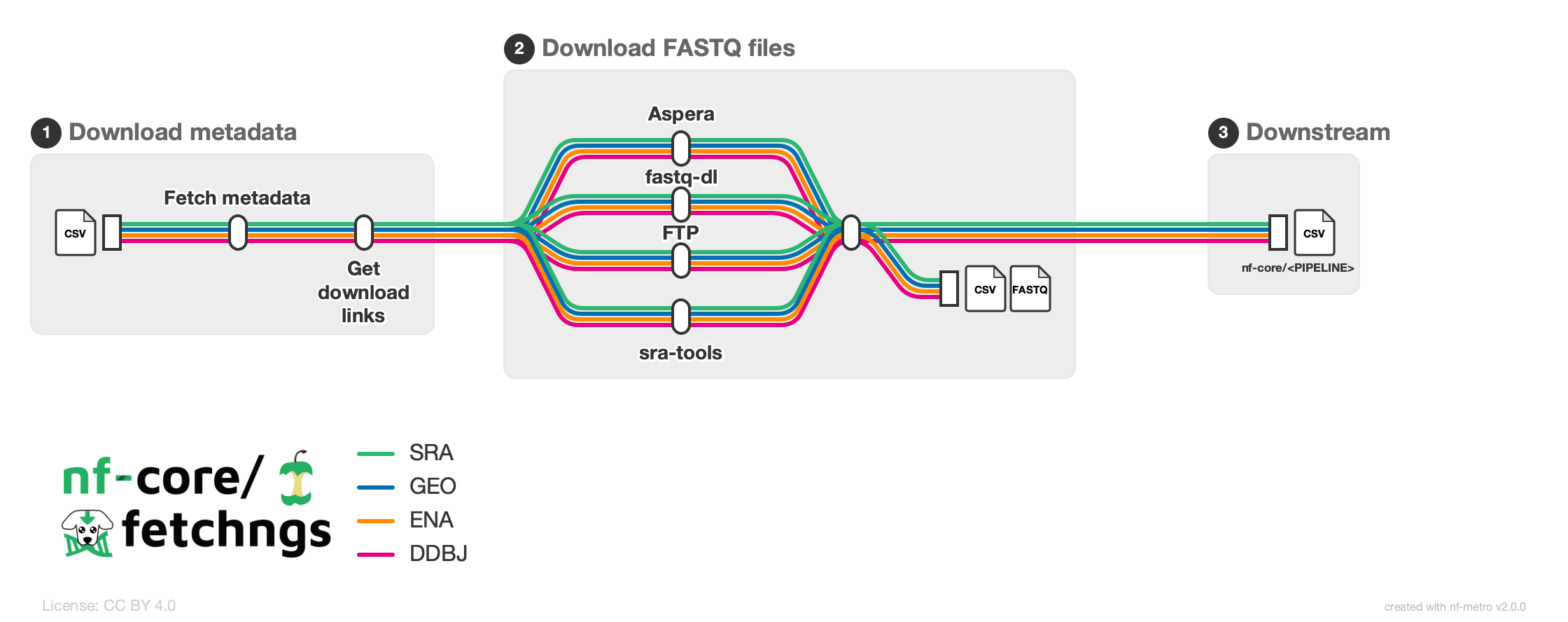
fetchngs 做的事情一句话讲清:输入一堆公共数据库 accession IDs(SRA / ENA / GEO / DDBJ),输出 FASTQ 文件 + metadata + 一张可直接喂给下游 nf-core pipeline 的 samplesheet.csv
它是 nf-core 里逻辑最简单的 pipeline 之一(没有比对、没有 QC、没有基因组索引),但把 nf-core 的全部架构模式都占全了:modules → subworkflows → workflow → config 分层 → nf-test
| 编号示例 | 通常代表什么 | 典型来源 |
|---|---|---|
GSE123456 |
GEO Series,一个研究项目 | GEO |
SRR12345678 |
SRA Run,一次测序运行 | SRA |
ERR1160846 |
ENA Run | ENA |
DRR028935 |
DDBJ Run | DDBJ |
2. 架构
2.1 nf-core的四层抽象
| 层级 | 是什么 | fetchngs 中的例子 |
|---|---|---|
| Process(装在 module 里) | 一个任务单元,运行一段 script,自带容器/资源声明 | SRA_IDS_TO_RUNINFO(查 metadata)、SRATOOLS_PREFETCH(下载 .sra) |
| Subworkflow | 几个 module 串起来完成一个子目标 | FASTQ_DOWNLOAD_PREFETCH_FASTERQDUMP_SRATOOLS(prefetch → fasterqdump) |
| Workflow | 完整业务逻辑,有 take/main/emit |
FETCHNGS(workflows/fetchngs.nf) |
| Pipeline | 可执行工程:workflow + config + schema + tests | 整个 repo,入口 main.nf |
- Process: 一台执行具体工作的机器
- Module: 给机器配好操作说明和接口,便于重复使用
- Subworkflow: 把几台机器组织成一个小型生产单元
- Workflow: 安排整个生产线的运行顺序和数据流转
Module 并不是 Nextflow 语言中与 Process 完全独立的执行原语。在 nf-core 项目中,module 通常是组织和复用 process 的标准方式
2.2 数据流
--input (IDs 文件,例如每行一个 SRR1234567)
        │
        ▼
┌──────────────────────────────────────────────┐
│ PIPELINE_INITIALISATION                      │
│ 验证参数(nf-schema)、打印 logo、读取 IDs   │
└──────────────────────┬───────────────────────┘
                       │ out.ids
                       ▼
┌─────────────────────────────────────────────────────────────────────┐
│ workflows/fetchngs.nf:FETCHNGS                                    │
│                                                                     │
│ SRA_IDS_TO_RUNINFO ──► SRA_RUNINFO_TO_FTP                           │
│   查询 ENA metadata       解析 TSV,获取 FTP/Aspera 下载链接         │
│                                  │                                  │
│                                  ▼                                  │
│                    splitCsv → map → branch                           │
│                                  │                                  │
│              ┌───────────────────┼──────────────────┐               │
│              ▼                   ▼                  ▼               │
│        SRA_FASTQ_FTP        ASPERA_CLI       SRATOOLS/FASTQDL        │
│        FTP 下载             Aspera 下载       其他下载路径           │
│              └───────────────────┼──────────────────┘               │
│                                  │ mix                               │
│                                  ▼                                  │
│                    CHANNEL_SRA_CREATE_CSV                            │
│                    生成 samplesheet.csv 和 mappings                 │
│                                  │                                  │
│                                  ▼                                  │
│                    MULTIQC_MAPPINGS_CONFIG                           │
└──────────────────────────────────┬──────────────────────────────────┘
                                   ▼
┌──────────────────────────────────────────────┐
│ PIPELINE_COMPLETION                          │
│ 汇总版本信息、生成报告、处理邮件通知等       │
└──────────────────────────────────────────────┘
2.3 文件结构
├── main.nf
├── nextflow.config
├── nextflow_schema.json
│
├── workflows/
│   └── fetchngs.nf
│
├── subworkflows/
│   ├── nf-core/
│   │   └── fastq_download_prefetch_fasterqdump_sratools/
│   └── local/
│       └── utils_nfcore_fetchngs_pipeline/
│
├── modules/
│   ├── nf-core/
│   │   └── ...
│   └── local/
│       └── sra_ids_to_runinfo/
│           ├── main.nf
│           ├── meta.yml
│           ├── environment.yml
│           └── nextflow.config
│
├── bin/
├── conf/
│   ├── base.config
│   ├── test.config
│   └── test_full.config
│
├── tests/
│   └── default.nf.test
│
└── modules.json| 文件或目录 | 作用 |
|---|---|
main.nf |
入口文件:组装初始化、主 workflow 和收尾流程 |
nextflow.config |
总配置:定义默认参数、profiles、插件及其他运行配置 |
nextflow_schema.json |
参数校验规则:通过 JSON Schema 描述 --input 等参数 |
workflows/fetchngs.nf |
主业务流程:组织各个 process、channel 和 subworkflow |
subworkflows/nf-core/ |
nf-core 提供或复用的子工作流 |
subworkflows/local/ |
当前 pipeline 特有的子工作流,例如初始化和收尾逻辑 |
modules/nf-core/ |
从 nf-core/modules 等共享模块体系引入的模块 |
modules/local/ |
当前 pipeline 自定义的模块 |
modules/local/sra_ids_to_runinfo/main.nf |
定义 process 的输入、输出和执行脚本 |
modules/local/sra_ids_to_runinfo/meta.yml |
模块的元数据和文档说明 |
modules/local/sra_ids_to_runinfo/environment.yml |
定义 Conda 环境及软件依赖,例如 Python 版本 |
modules/local/sra_ids_to_runinfo/nextflow.config |
模块专属配置,例如 publishDir 等 |
bin/ |
存放随 pipeline 分发的辅助脚本 |
conf/ |
存放基础配置、测试配置和完整测试配置 |
tests/default.nf.test |
使用 nf-test 编写的自动化测试 |
modules.json |
记录已安装 nf-core 模块的来源与版本等信息 |
3. 分步解析
3.1 main.nf
在项目中,main.nf是整个项目管道的主要入门文件,Nextflow 不是”顺序执行脚本”,而是”声明式地构建一张数据流图,然后由调度器执行”, main.nf 之所以能”起流程”,是因为 Nextflow 把组件间的输入输出连接解释成一张数据流 DAG,由引擎按依赖自动调度执行,而不是靠代码的书写顺序.
用户输入 (--input ids.csv)
        │
        ▼
┌─────────────────────────┐
│  PIPELINE_INITIALISATION │  ← 参数校验、环境检查、日志初始化
│  (子流程: 启动阶段)       │
└─────────┬───────────────┘
          │ out.ids
          ▼
┌─────────────────────────┐
│  NFCORE_FETCHNGS         │  ← 调用 FETCHNGS 工作流
│  (命名工作流: 核心阶段)   │    查询数据库 → 下载 FastQ → 生成样本表
│        │                  │
│        ├─ take: ids       │
│        └─ main: FETCHNGS() │
└─────────┬───────────────┘
          │
          ▼
┌─────────────────────────┐
│  PIPELINE_COMPLETION      │  ← 生成报告、发送邮件通知
│  (子流程: 收尾阶段)       │
└─────────────────────────┘
        │
        ▼
输出目录 (--outdir) ← 发邮件、汇总报告- 文件头部与元信息
#!/usr/bin/env nextflowShebang 行,声明用 nextflow 解释器执行此脚本
Shebang(读作 “shuh-bang”)是 Unix/Linux 系统里一个约定俗成的术语,指脚本文件第一行开头的两个字符 #!,后面紧跟解释器的路径
#在英文里叫 “hash”(或 “sharp”)!叫 “bang”
/*
nf-core/fetchngs
Github : https://github.com/nf-core/fetchngs
Website: https://nf-co.re/fetchngs
Slack : https://nfcore.slack.com/channels/fetchngs
*/
这是 nf-core 项目的标准头部注释块,标注项目名和联系方式
- 导入模块/子流程/工作流
include { FETCHNGS } from './workflows/fetchngs'
include { PIPELINE_INITIALISATION } from './subworkflows/local/utils_nfcore_fetchngs_pipeline'
include { PIPELINE_COMPLETION } from './subworkflows/local/utils_nfcore_fetchngs_pipeline'
这是DSL2风格的
include语句,从其他文件中导入三个核心组件
| 导入名 | 来源文件 | 作用 |
|---|---|---|
FETCHNGS |
workflows/fetchngs |
核心工作流:执行实际的数据库查询和 FastQ 文件下载 |
PIPELINE_INITIALISATION |
subworkflows/.../utils_nfcore_fetchngs_pipeline |
初始化子流程:参数校验、环境检查、日志设置等启动任务 |
PIPELINE_COMPLETION |
subworkflows/.../utils_nfcore_fetchngs_pipeline |
完成子流程:生成报告、发送通知邮件等收尾任务 |
- 命名工作流定义
这里定义了一个命名工作流 NFCORE_FETCHNGS, 它有两个关键区域:
take: 区域(输入声明):ids:声明这个工作流接收一个名为ids的Channel输入main: 区域 (执行逻辑):调用FETCHNGS工作流执行核心任务,传入8个参数params.dbgap_key ? file(...) : []—— 三元运算符:如果 dbgap_key 参数存在则转为文件对象,否则传空列表params.ena_metadata_fields ?: ''—— Elvis 运算符:如果 ena_metadata_fields 为 null 则用空字符串替代
workflow NFCORE_FETCHNGS {
    take:
    ids

    main:
    FETCHNGS(ids, params.outdir, ...)
}
这是一个具名工作流,它做的事情本质上只有一件:把匿名 workflow 里的 ids 通道,连同 params.* 一起,转交给
FETCHNGS“直接写 workflow 不可以吗”——技术上可以。你完全可以在匿名 workflow 里直接调用
FETCHNGS(...),删掉这层包装,流程照样能跑。nf-core 这么做,是出于工程约定和长期维护的考虑,不是语法强制
take 是 block-style workflow 里用来声明输入的块,它的作用是把外部传入的参数 / 通道显式地 “接住” 并命名,供 main 块里使用。等价于传统写法
workflow NFCORE_FETCHNGS {
    // 没有 take,直接在 main 里用 channel 引用
    main:
        FETCHNGS(channel_from_somewhere, ...)
}
take是可选的,取决于你用哪种写法,具名 workflow(如NFCORE_FETCHNGS)通常有 take,因为它要被顶层 workflow 调用,需要明确的 “参数列表”
- 入口 workflow
workflow {
    PIPELINE_INITIALISATION(...)
    NFCORE_FETCHNGS(PIPELINE_INITIALISATION.out.ids)
    PIPELINE_COMPLETION(...)
}- 没有名字
- 是脚本的默认执行入口
- 通常负责读取 params、做初始化、收尾和整体编排
- Nextflow 启动时会自动从这里开始跑
3.2 workflows/fetchngs.nf
上一步的main.nf主要回答了三个问题
- 程序从哪里开始跑:匿名入口 workflow { … },Nextflow 启动就执行它
- 整个流程分几段:初始化
PIPELINE_INITIALISATION→ 主逻辑NFCORE_FETCHNGS→ 收尾PIPELINE_COMPLETION - 参数怎么流进去:入口读
params,把初始化输出的 ids 通道传给命名 workflow,其余配置靠全局 params
但
main.nf完全没回答:拿到一堆 SRR/ERR/DRR 号之后,到底怎么变成 FastQ 文件的
workflows/fetchngs.nf这个文件是fetchngs管道的核心工作流,定义了拿到ID之后怎么查元数据,怎么下载FastQ,怎么生成samplesheet的完整逻辑
- 导入模板
/* IMPORT LOCAL MODULES/SUBWORKFLOWS/FUNCTIONS */
include { ASPERA_CLI} from '../modules/local/aspera_cli'
include { MULTIQC_MAPPINGS_CONFIG} from '../modules/local/multiqc_mappings_config'
include { SRA_FASTQ_FTP} from '../modules/local/sra_fastq_ftp'
include { SRA_IDS_TO_RUNINFO} from '../modules/local/sra_ids_to_runinfo'
include { SRA_RUNINFO_TO_FTP} from '../modules/local/sra_runinfo_to_ftp'
include { CHANNEL_SRA_CREATE_CSV} from '../subworkflows/local/channel_sra_create_csv'

/* IMPORT NF-CORE MODULES/SUBWORKFLOWS/FUNCTIONS */
include { FASTQDL} from '../modules/nf-core/fastqdl'
include { FASTQ_DOWNLOAD_PREFETCH_FASTERQDUMP_SRATOOLS} from '../subworkflows/nf-core/fastq_内部工具_prefetch_fasterqdump_sratools'
include { softwareVersionsToYAML} from 'plugin/nf-core-utils'
导入了10个组件
| 来源 | 组件 | 作用 |
|---|---|---|
| local(项目自建) | SRA_IDS_TO_RUNINFO |
把用户输入的 SRR/ERR/DRR 号发给 ENA 查元数据 |
| local | SRA_RUNINFO_TO_FTP |
解析元数据,提取 FTP 下载链接 |
| local | SRA_FASTQ_FTP |
通过 FTP 下载 FastQ 文件并做 md5 校验 |
| local | ASPERA_CLI |
通过 Aspera 协议高速下载 FastQ |
| local | CHANNEL_SRA_CREATE_CSV |
把所有下载的 FastQ 汇总成 samplesheet |
| local | MULTIQC_MAPPINGS_CONFIG |
生成 MultiQC 用的样本名映射配置文件 |
| nf-core | FASTQDL |
用 fastq-dl 工具下载 FastQ(第三方工具) |
| nf-core | FASTQ_DOWNLOAD_PREFETCH_FASTERQDUMP_SRATOOLS |
用 sra-tools(prefetch + fasterq-dump)下载并转换 FastQ |
| plugin | softwareVersionsToYAML |
收集并输出软件版本信息 |
“谁调用 FETCHNGS,谁就必须按顺序(或用命名参数)把这些东西传进来。”
3.3 schema 契约文件
4. 简单重建
4.1 Schema 契约
assets中的契约文件
因为后面的每一步都拿它当判据或依赖,而它自己不依赖任何东西
nf-core 生态的标准接口位置:真实 fetchngs 装了 nf-schema 插件,插件直接读这个文件自动完成校验和报错,根本不用手写校验代码。我们今天手写,是为了让你看见底层;将来你把校验升级成插件时,接口文件原地不动、只删代码——这就是“实现可以换、契约不换”。
在assets文件夹中写入schema_input.json,assets/ 的职责 = “运行时静态资源”
   assets/
   ├── email_template.html        ← 完成时发邮件用的 HTML 模板
   ├── email_template.txt         ← 纯文本版
   ├── sendmail_template.txt      ← sendmail 命令的模板
   ├── nf-core-fetchngs_logo_light.png
   ├── metro_map.mmd              ← 流程图源文件
└── schema_input.json ← 输入校验规则 - 根目录的
nextflow_schema.json
它描述的是命令行参数长什么样,主要给 nf-schema / 老的 nf-validation 插件做参数校验,同时用来生成 --help\、网页参数文档和启动界面。你写的 pattern": "^\\S+\\.(csv|tsv|txt)$" 就在这一层,它只保证你传给 --input 的字符串是个 csv/tsv/txt 路径,完全不关心文件里面写了什么
| 根目录 nextflow_schema.json | assets/schema_input.json | |
|---|---|---|
| 契约内容 | 命令行参数长什么样(–input、–outdir…) | –input 指向的文件里每一行长什么样 |
| 消费者 | nf-schema 插件(参数校验 + 文档生成) | samplesheetToList()(行级校验) |
| 粒度 | param 级 | row 级 |
4.1 最小的骨架
一个process + 一条 channel
先跑通channel进, process执行,文件发布这个核心循环
#! /usr/bin/env nextflow

// mini-fetchngs/main.nf

process SRA_IDS_TO_RUNINFO {

    tag "$id" // 日志里显示任务名,而不是hash

    input:
    val id //从channel收到的一个accession, 如 `SRR12345`

    output:
    path "${id}.runinfo.tsv" // 输出文件名,声明产出,变成输出channel

    script:
    """
    echo  "fake metadata for ${id}" > ${id}.runinfo.tsv
    """
}

workflow{
    ch_ids = channel.of('SR123456','SRR1234') // 2个元素--任务自动并行
    SRA_IDS_TO_RUNINFO(ch_ids)
    SRA_IDS_TO_RUNINFO.out[0].view() // view()打印channel内容
}
这一步要理解的机制:process 不被“调用”而是被 channel “喂”;channel 里有多少元素,任务就并行多少份 —— 这就是 dataflow programming,你从不写 for 循环和调度
4.2 把process拆成module
创建 modules/local/sra_ids_to_runinfo/main.nf,把上面的 process 原样搬过去,再补上 nf-core 模块的三个标配(modules/local/sra_ids_to_runinfo/main.nf:1-32 就是真实范本):
| 文件或目录 | 作用 | 类比 |
|---|---|---|
main.nf |
定义 process 的输入、输出和执行脚本 | 实际操作说明 |
meta.yml |
描述模块的用途、输入输出等元数据 | 模块说明书 |
tests/ |
存放模块测试配置和测试数据引用 | 验收测试 |
- 创建modules
在主main.nf创建modules/local/sra_ids_to_runinfo/main.nf,然后把process放入
mini-fetchngs/
├── main.nf                          # 主流程:组织整个工作流
└── modules/
    └── local/                       # 项目自己编写的模块
        └── sra_ids_to_runinfo/
            ├── main.nf              # 定义 process 的输入、输出和执行脚本
            ├── meta.yml             # 描述模块的用途、输入输出等元数据
└── tests/ # 存放模块测试配置和测试数据引用- 把process搬过去
process SRA_IDS_TO_RUNINFO {
    tag "$id"

    input:
    val id

    output:
    path "${id}.tsv", emit: tsv      // 唯一的新增:给输出起名

    script:
    """
    echo "fake metadata for ${id}" > ${id}.tsv   // ← 还是 Step 1 的 echo
    """
}在main.nf中写入此功能
include { SRA_IDS_TO_RUNINFO } from './modules/local/sra_ids_to_runinfo'

workflow {
    ch_ids = channel.of('SRR1234567', 'SRR1234568')
    SRA_IDS_TO_RUNINFO(ch_ids)
    SRA_IDS_TO_RUNINFO.out.tsv.view()   // 用名字取输出,不再用 .out[0]
}
重构的定义:改变组织,不改变行为
文件分家之后,调用方不能再靠“输出顺序”取东西,只能靠名字
4.3 让数据流动起来(管线的灵魂)
process 之间不是直线相连,而是由 operator 加工过的 channel 相连
先升级假数据:真实世界里一个 GSE/SRP id 查回来的 runinfo 往往包含多个 run,让假数据模拟这一点:
// modules/local/sra_ids_to_runinfo/main.nf —— 只改 script 和 output
process SRA_IDS_TO_RUNINFO {
    tag "$id"

    input:
    val id

    output:
    path "${id}.runinfo.tsv", emit: tsv

    script:
    // \\t 在 Groovy 字符串里转成字面 \t,再由 bash 的 echo -e 转成真制表符
    """
    echo -e 'run_accession\\tsingle_end\\tfastq_1\\tfastq_2' > ${id}.runinfo.tsv
    echo -e 'SRR111\\tfalse\\thttps://ftp/SRR111_1.fastq.gz\\thttps://ftp/SRR111_2.fastq.gz' >> ${id}.runinfo.tsv
    echo -e 'SRR112\\ttrue\\thttps://ftp/SRR112.fastq.gz\\t' >> ${id}.runinfo.tsv
    echo -e 'SRR113\\tfalse\\t\\t' >> ${id}.runinfo.tsv
    """
}
这个例子是在模拟真实生信工作流中的一个中间文件。
在真实的 SRA 数据获取流程中,RunInfo 表格通常用于记录 accession、测序类型以及 FASTQ 文件地址等信息,后续步骤可以根据这些字段决定如何下载或组织数据。
算子链:文件 → 逐行 map → 分流
4.4 实际的sra_ids_to_runinfo module
这个模块实际的作用就是一行 TSV = 一个 run 的档案: GEO/SRA 系列级 ID 先经 NCBI eutils 展开成实验级,再从 ENA 拉全表
tag "${id}": 给每个任务打上标签,方便在日志中识别label 'error_retry'— 新概念:给 process 打标签,然后在conf/base.config里用withLabel: error_retry { errorStrategy 'retry' }统一配置策略。conda + container双声明 — 同一个模块给两种容器引擎准备环境:用 conda 就读environment.yml,用 Docker/Podman 就拉 biocontainers 镜像。三元表达式是按引擎选镜像地址(Singularity 用 galaxy depot 的镜像仓库)。- nextflow的输入输出设置
- 配上script和def声明变量
stub 块 = 剧组的替身演员。加 -stub-run 运行时,真 script 不执行,执行这个:touch 一个空文件,文件名满足 output 的 glob(*.tsv),于是下游照常能“收到”文件、管线照常往下走。
使用场景:改了管线接线,想验证“channel 连得对不对、glob 匹配不匹配”,但不想真调 API/下载数据。touch 几毫秒一个任务,几百样本的管线几秒测完。nf-core 规范强制每个模块写 stub,道理同 R 包必须能 R CMD check 通过。
然后在文件夹中串联起来模块进行测试,创建文件夹ex4/main.nf
5. nf-core搭建
nf-core 是一个全球社区,致力于协作构建开源的 Nextflow 组件和管.
nf-core 提供了一套标准化的最佳实践、指南和模板,用于构建和共享生物信息学流程。这些流程采用模块化、可扩展和可移植的设计,使研究人员能够轻松地使用自己的数据和计算资源进行调整和执行。
nf-core 的主要优势在于其开放的开发、测试和同行评审机制,确保流程稳健可靠、文档齐全,并经过真实数据集的验证。这有助于提高生物信息学分析的可靠性和可重复性,并最终帮助研究人员加速科学发现。
nf-core相当于nextflow的实际应用社区,所以前提要安装nextflow
5.1 nf-core tools 安装
nf-core tools 是一个 Python 包,它提供用于操作 nf-core 流水线的命令行工具。虽然它是可选的,但它提供了一些有用的功能,可用于下载、启动和开发流水线。
nf-core 工具包提供以下命令:
- 列出可用的 nf-core 管道和组件
- 下载管道以供离线使用
- 启动具有自定义参数的管道
- 创建和开发新的管道和组件
- 管道代码检查和验证
# 1. Create a new environment:
conda create --name nf-core-env nf-core nextflow

# 2. Activate the environment:
conda activate nf-core-env

# 3. Verify the installation
nf-core --version
nextflow -version
# 1. Install the package:
pip install nf-core
# 2. Verify the installation
nf-core --version# 1. Pull the nfcore/tools Docker image:
docker pull nfcore/tools
# 2. Run nf-core tools commands using Docker:
docker run -itv `pwd`:`pwd` -w `pwd` -u $(id -u):$(id -g) nfcore/tools --help
# 3. 改写快捷键
alias nf-core="docker run -itv \`pwd\`:\`pwd\` -w \`pwd\` -u $(id -u):$(id -g) nfcore/tools"5.2 Creating a new pipeline
create 子命令使用 nf-core 基本模板创建一个新的管道。根据给定的管道名称、描述和作者,它会创建一个遵循 nf-core 最佳实践的初始管道
运行命令后,在 GitHub 上以您的用户名创建一个新的空仓库(暂时不要使用 nf-core 组织),然后使用上述日志中的示例命令从您的计算机推送提交。之后,您就可以像往常一样继续编辑、提交和推送,构建您的流水线。
                                          ,--./,-.
          ___     __   __   __   ___     /,-._.--~\
    |\ | |__  __ /  ` /  \ |__) |__         }  {
    | \| |       \__, \__/ |  \ |___     \`-._,-`-,
                                          `._,._,'

    nf-core/tools version 4.1.0 - https://nf-co.re


 Usage: nf-core pipelines create [OPTIONS]

 Create a new pipeline using the nf-core template.
 Aliases: c

 ═ Options ════════════════════════════════════════════════════════════
 --name           -n  The name of your new pipeline [TEXT]
 --description    -d  A short description of your pipeline [TEXT]
 --author         -a  Name of the main author(s) [TEXT]
 --version            The initial version number to use [TEXT]
 --force          -f  Overwrite output directory if it already exists
 --outdir         -o  Output directory for new pipeline (default:
                      pipeline name) [TEXT]
 --template-yaml  -t  Pass a YAML file to customize the template [TEXT]
 --organisation       The name of the GitHub organisation where the
                      pipeline will be hosted (default: nf-core) [TEXT]
 --help           -h  Show this message and exit.
nf-core pipelines create命令,基于 nf-core 官方模板,快速创建一个新的 Nextflow 生信分析流程。 它不仅生成代码骨架,还可以配置测试、模块、参数校验、文档和代码质量检查等配套设施
nf-core 的模板理解为一个已经规划好目录、开发规范和质量检查的生信流程项目脚手架。
使用nf-core pipelines create可进入交互式创建
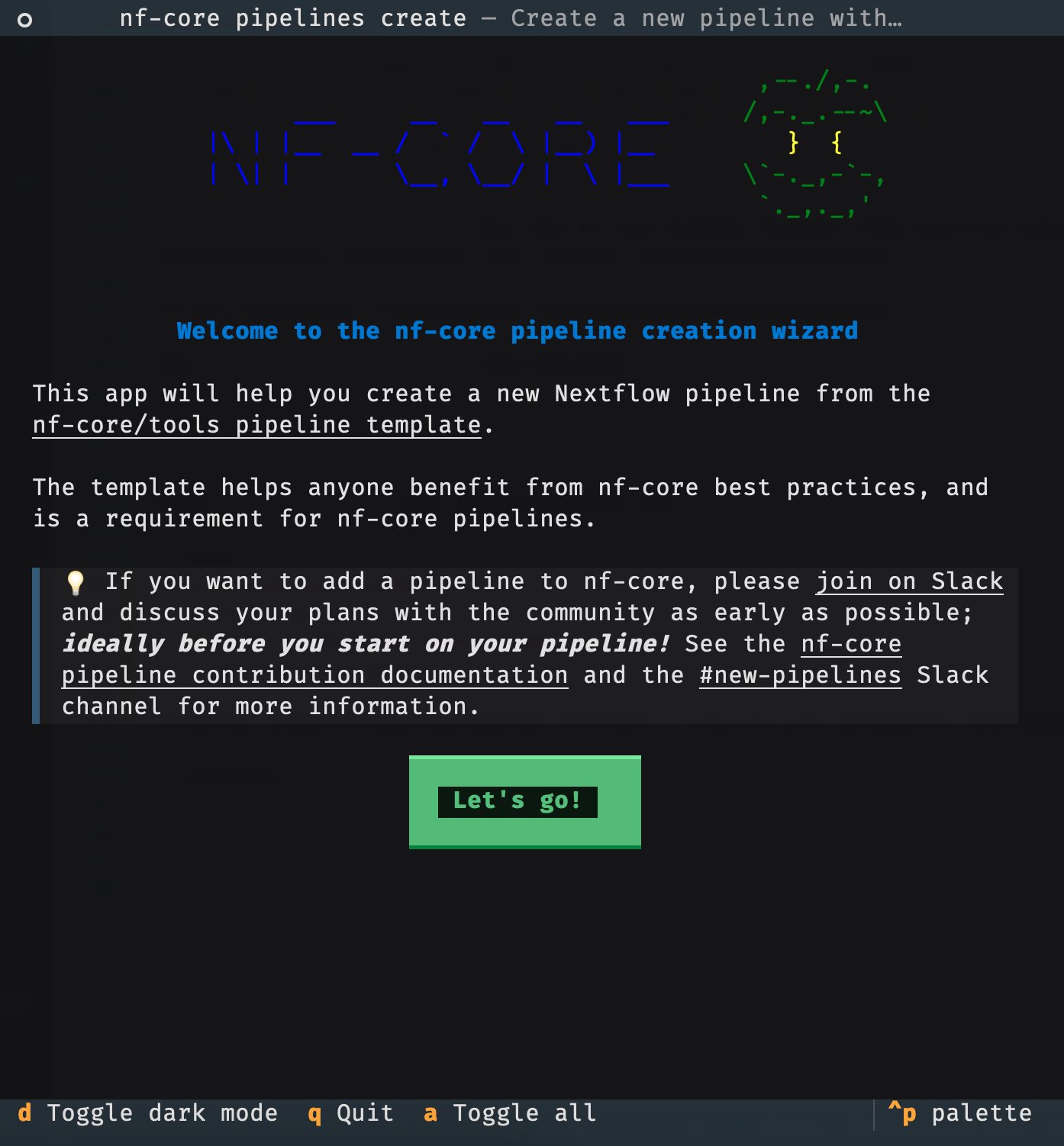
而使用--template-yaml参数,可以自定义创建选项,例如:
nf-core pipelines create \
    --name testname \
    --description "text description" \
    --author "Your Name"
命令运行后,会通过交互界面让你选择模板功能;也可以使用 –template-yaml 提供配置文件,自定义创建选项。
- 可以先推送到github
- 也可以先处理完之后自己推送到github上
创建好的文件结构如下
nf-core-test on git master
> tree -h
[ 960]  .
├-- [ 192]  assets
|   ├-- [3.2K]  email_template.html
|   ├-- [1.1K]  email_template.txt
|   ├-- [ 62K]  nf-core-test_logo_light.png
|   +-- [ 662]  sendmail_template.txt
├-- [ 429]  CHANGELOG.md
├-- [2.2K]  CITATIONS.md
├-- [ 13K]  CODE_OF_CONDUCT.md
├-- [ 192]  conf
|   ├-- [2.6K]  base.config
|   ├-- [ 980]  modules.config
|   ├-- [1.2K]  test_full.config
|   +-- [1.1K]  test.config
├-- [ 224]  docs
|   ├-- [ 10K]  CONTRIBUTING.md
|   ├-- [ 128]  images
|   |   ├-- [ 23K]  nf-core-test_logo_dark.png
|   |   +-- [ 20K]  nf-core-test_logo_light.png
|   ├-- [1.6K]  output.md
|   ├-- [ 504]  README.md
|   +-- [ 14K]  usage.md
├-- [1.0K]  LICENSE
├-- [2.3K]  main.nf
├-- [ 828]  modules.json
├-- [9.1K]  nextflow.config
├-- [1.0K]  nf-test.config
├-- [6.8K]  README.md
├-- [ 15K]  ro-crate-metadata.json
├-- [ 128]  subworkflows
|   ├-- [  96]  local
|   |   +-- [  96]  utils_nfcore_test_pipeline
|   |       +-- [7.0K]  main.nf
|   +-- [ 128]  nf-core
|       ├-- [ 160]  utils_nextflow_pipeline
|       |   ├-- [3.9K]  main.nf
|       |   ├-- [1.0K]  meta.yml
|       |   +-- [ 192]  tests
|       |       ├-- [1.2K]  main.function.nf.test
|       |       ├-- [ 468]  main.function.nf.test.snap
|       |       ├-- [2.7K]  main.workflow.nf.test
|       |       +-- [ 304]  nextflow.config
|       +-- [ 160]  utils_nfcore_pipeline
|           ├-- [ 15K]  main.nf
|           ├-- [ 606]  meta.yml
|           +-- [ 288]  tests
|               ├-- [3.0K]  main.function.nf.test
|               ├-- [4.2K]  main.function.nf.test.snap
|               ├-- [ 687]  main.nf.test
|               ├-- [ 395]  main.nf.test.snap
|               ├-- [ 687]  main.workflow.nf.test
|               ├-- [ 395]  main.workflow.nf.test.snap
|               +-- [ 305]  nextflow.config
├-- [ 160]  tests
|   ├-- [1.2K]  default.nf.test
|   +-- [ 618]  nextflow.config
├-- [ 107]  tower.yml
+-- [  96]  workflows
    +-- [2.0K]  test.nf

15 directories, 44 files
5.3 Creating a module
nf-core对于modules是提供了快捷的创建方式,使用
- local modules的创建
nf-core modules create会进入交互式的构建界面
> nf-core modules create


                                          ,--./,-.
          ___     __   __   __   ___     /,-._.--~\
    |\ | |__  __ /  ` /  \ |__) |__         }  {
    | \| |       \__, \__/ |  \ |___     \`-._,-`-,
                                          `._,._,'

    nf-core/tools version 4.1.0 - https://nf-co.re
    There is a new version of nf-core/tools available! (4.2.0)


INFO     Repository type: pipeline
INFO     Press enter to use default values (shown in brackets) or type your own responses.
         ctrl+click underlined text to open links.
Name of tool/subtool:- 你要封装的工具叫什么名字
- 自动搜索 Bioconda /bio.tools
- GitHub username
- Process resource label(资源标签)
- 这个模块的输入要不要带样本元信息
自己也可以输入所有的参数跳过交互式向导
nf-core modules create sraidstoruninfo \
  --author @yourusername \
  --label process_low \
  --meta
核心交互就 5 步 —— 名字 → GitHub 用户名 → 资源标签 → 要不要 meta map → 输入输出格式
然后创建出模板来,模板结构如下
> tree -h
[4.0K]  .
└── [4.0K]  local
    └── [4.0K]  sraidstoruninfo
        ├── [ 476]  environment.yml
        ├── [5.1K]  main.nf
        ├── [1.9K]  meta.yml
        └── [4.0K]  tests
└── [2.3K] main.nf.test- remote
nf-core本身提供了大量的modules,直接可以搜索安装即可使用,然后再调用
# 1. 搜索modules,查看github上模板
nf-core moduels list remote

# 2. 安装
nf-core modules install fastqc

# 3. 安装带子命令的(如 samtools view)
nf-core modules install samtools/view安装后,文件出现在项目中的modules
nf-core-mytest/modules/nf-core on git master [!?]
> tree -h
[4.0K]  .
├── [4.0K]  fastqc
│   ├── [ 206]  environment.yml
│   ├── [2.4K]  main.nf
│   ├── [3.6K]  meta.yml
│   └── [4.0K]  tests
│       ├── [ 12K]  main.nf.test
│       └── [ 14K]  main.nf.test.snap
└── [4.0K]  fastqdl
    ├── [ 207]  environment.yml
    ├── [1.4K]  main.nf
    ├── [3.8K]  meta.yml
    └── [4.0K]  tests
        ├── [2.0K]  main.nf.test
        └── [5.0K]  main.nf.test.snap

4 directories, 10 files